Another Reason Not to Travel with Your Laptop

Diposting oleh fatih on Selasa, 20 Oktober 2009

Another Reason Not to Travel with Your Laptop

Troy Davis, a former officer with the Transportation Security Administration, has admitted to authorities that he stole laptops and video game systems from passengers' checked luggage. Davis used to work as an airport screener at Philadelphia International Airport.

A baggage handler spotted Davis taking a laptop from a suitcase and hiding it behind an explosive-detection machine earlier this year. The witness notified supervisors who later discovered four laptops and a game console in the same area.

The 36-year-old Davis pleaded guilty yesterday to the charges and will be sentenced by a federal court in January.

It seems as though nothing is safe these days, especially when you are traveling. Once your luggage leaves your hands, you can never be exactly sure where it'll end up or whose hands it will fall into. Could a devious airport employee like Troy Davis be waiting for the bag, containing your laptop, to pass through security? Could your entire suitcase get lost and end up in a city 2,000 miles away from where you are going?

These are certainly things to consider when packing, whether it be for a business or personal trip, but these incidents are avoidable. Whether you're traveling to a business meeting or just taking your laptop along on the family vacation, so you can keep up with your business, you should always consider a quality Laptop Rental, instead.

There are so many different ways to save your data and most of them are compatible with almost any computer. Worried about the cost? A rental fee is a small price to pay compared to the potential thousands of dollars, not to mention the sentiment from personal files, you could lose when traveling. Instead of risking theft, loss, or damage to your personal computer, consider having a rental meet you at your destination.

Read More

This I Believe Goes Global- We Want You!

Diposting oleh fatih on Senin, 19 Oktober 2009

For the past three years, I have had my classes write their versions of National Public Radio’s “This I Believe” segment. I was introduced to this idea by a colleague and have been always impressed by what my students hold as their personal values and beliefs. Writing these essays has allowed for them to do something they don’t get to do all that often at school - express their heartfelt beliefs. After writing the essays the first year, we submitted them to NPR, but we also decided to podcast them ourselves – no need to wait to see if NPR might choose to broadcast them. The writing was good at expressing their values, but once their voice was added to their written expression, WOW, it simply transformed that personal essay. Instead of the words simply being words, the words conveyed deeply held emotions. Now, this is the standard.Previous class examples:
Period 2 06-07
Period 5 06-07
Period 3 06-07
Period 2 07-08
Period 5 07-08
Period 3 07-08
Wiki 09-10

We are approaching that time of year, when I am going to start the kids on this writing adventure, but this year I wanted to invite you in the blog-o-sphere to join us again. I want “This I Believe” to go global. I want my students to benefit not only from knowing what their peers believe, or what the other AHS classes believe, but to hear and see what the world values. What do kids elsewhere in the U.S. believe in? What do kids elsewhere in the world believe in? What do some of the learned professionals that I know believe in? I want my students to walk away from this experience realizing the power they have as professional writers as well as connecting to other teenagers and adults from around the world. I want to see them exchange ideas, foster relationships, and appreciate the variety of perspectives. Maybe you can challenge your principal, your school board members, your local politicians, heck, maybe your entire school. Maybe we can even get our President to write his own “This I Believe.”

So, how do we accomplish this? Karl Fisch, of course, is willing to be my master facilitator. He has set up a wiki (still a work in progress) that will provide the guidelines for the classes to follow. I am making Maura Moritz’s classes join us again, so there will be four classes (ninth grade, 14 and 15 years old) from AHS writing and podcasting their essays: Moritz 3, Moritz 4, Smith 2, and Smith 5. We are hoping to attract at least three other classes from around the world, one each to pair up with each of our four classes. If we get more than four classes that are interested, then we will try to pair up any additional classes with another class somewhere in the world. If your class(es) are interested, please complete this Google Form with some basic information (your name, your email address, school name, location, grade level(s)/ages, how many classes, number of students in each class, and time frame that you’d like to do this) so we can setup those partnerships. (Our thinking is that pairing one class with one class will keep this from becoming too overwhelming for the students, although of course anyone can read/listen/comment to any of the essays on any of the wiki pages).We will create a wiki page for each set of paired classes and each student will upload their written essay as well as their podcast (the podcast can either be uploaded directly to the wiki, or you can use a variety of other services for that and then link to them). Each pair of classes will be in charge of their own wiki page and we’ll use the discussion tabs on each page to give feedback to the students. If you are an adult interested in writing a piece yourself, simply add them to the “adults” page on the wiki. I am hoping to get some notable edubloggers as well as my superintendent, CIO, and others to participate. It would also be helpful to include a brief bio so the kids can know who they are reading about.Obviously you don’t have to do this with us or on our wiki, you can create your own. But we thought it might be interesting and helpful to have one wiki that aggregated all these essays/podcasts, one place that students (and others) could visit to learn about beliefs all over the world.

Wondering where to start? NPR has a number of education friendly links to help you along the process:
For Educators
For Students
Essay writing tips
How to contribute an essay to NPR

Timeline: For our classes we are going to start writing our essays, November 6th with a final due date of November 13th for their essay. The following week they will begin podcasting their essays. The paired classes don’t have to match this timeline exactly (although that would be great), but we’re hoping they can have theirs completed by Thanksgiving so that the students can start commenting on each other’s essays/podcasts.But for other pairings you can set whatever time frame works best for you – that’s the beauty of the wiki, it’s a living document with no “end” to the assignment (although that’s why we need you to include your time frame when you email us so that we can try to match folks up). We would really appreciate any feedback (now or as this progresses) to make this an experience that is truly relevant and meaningful for these kids.
Read More

Sony VAIO X Series Ultra Thin Laptops

Diposting oleh fatih on Jumat, 16 Oktober 2009

Sony VAIO X SeriesIt seems, in the computer world, that thin is the way to go theses days. When the MacBook Air was released by Apple, many of us thought that we couldn't get any thinner. well we were wrong. Sony's VAIO X Series of laptops has proved to be smaller, thinner and lighter than the MacBook Air. While looking at this laptop, you may notice the Intel Atom processor and compare it to be the same as other netbooks. However, this machine is something different completely.

How is this netbook so thin you may ask? Well for starters, the motherboard has all of its components soldiered onto one side of it. In addition to that, all the components are stuffed into the back of the motherboard leaving the front half to house the battery. This interesting choice of design has resulted in the thinnest machine on the market coming in at 16mm throughout. If you want to plug in an Ethernet cord, then you are going to have to the drop-down legs at the back of the netbook because the Ethernet connection is thicker than the actual laptop.

The keyboard has nice spacing, allowing you to easily type at speed. However, the keys only move a fraction when under pressure and don't have much space for travel which will not suit all users. The touchpad is tiny but responsive allowing precise control and the accompanying buttons are somewhat big and do not offer much movement. The X Series comes with an 11.1inch display which is expected for a mid-range laptop although this is better than nearly any one currently on the market. It has amazing color reproduction and comes with a 1366x768 pixel resolution.

Just like the VAIO P Series, the X Series has an Intel Atom Processor and came in at 2GHz offering enough power for most of your office tasks. It also comes with a 256GB solid state drive but only only has 2GB of memory. The X Series chassis is made out of carbon fiber which helps keep it light at a 775g. But this light weight comes at a price. The body flexes heavily under light pressure. But the carbon finish and glossy lid makes the device feel like a premium product.

The X Series is limited on ports having only two USB ports located on the left side of the device and one VGA and one Ethernet on the right side. Support for SD cards can be accessed on the front as well as a place for Sony's memory stick formats. The X Series has 802.11n Wi-Fi as well as Gigabit Ethernet and range topping models get 3G/HSDPA with the SIM card sliding in behind the battery. As soon as you see this thing your first reaction is going to be "whoa". It literally is that small. If you are a business man who values tiny dimensions as well as the lowest weight possible then the VAIO X Series is the exact laptop for you.
Read More

Freeware Panda USB Vaccine 1.0.1.4

Diposting oleh fatih on Kamis, 15 Oktober 2009

Panda USB Vaccine is a free utility from Panda Security Research which helps prevent malware infections due to the autorun feature of Windows Operating Systems. Once executed the user can choose two types of vaccinations: Computer Vaccination or USB Drive Vaccination.

USB Vaccine allows users to vaccinate their PCs in order to disable autorun completely so that no program from any USB/CD/DVD drive (regardless of whether they have been previously vaccinated or not) can auto-execute. This is a really helpful feature as there is no user friendly and easy way of completely disabling autorun on a Windows PC.

Panda USB Vaccine can be used on individual USB drives to disable its autorun.inf file in order to prevent malware infections from spreading automatically. When applied on a USB drive, the vaccine permanently blocks an innocuous AUTORUN.INF file, preventing it from being read, created, deleted or modified. Once applied it effectivelly disables Windows from automatically executing any malicious file that might be stored in that particular USB drive. The drive can otherwise be used normally and files (even malware) copied to/from it, but they will be prevented from opening automatically. Panda USB Vaccine currently only works on FAT & FAT32 USB drives. Also keep in mind that USB drives that have been vaccinated cannot be reversed except with a format.

OS: Win 2000/XP/Vista
Size: 829KB

Download


Read More

Cellphones in the classroom- POLLEVERYWHERE ROCKS

Diposting oleh fatih on Selasa, 13 Oktober 2009


This past week, I wanted to get the kids thinking about the role of our government, who do they work for, what is the role of mass media, who controls us, are textbooks accurate (ask Gary Stager about this), etc…

We just finished our unit on Macbeth and Lord of the Flies, where we were looking at the question “What does it take to challenge the system?”. We are going to continue pursuing this question now through our study of Fahrenheit 451 and a couple of short stories “The Pedestrian” by Ray Bradbury and “Harrison Bergeron” by Kurt Vonnegut. Also, to get the kids thinking about technologies role in their lives in connection with the novel, we watched Dr. Wesch’s A Vision of Students Today and The Machines are Using Us. (Of course, we already have watched the infamous DYK).

In order to get the kids to shift into a new novel, and while continuing to thinki about those questions above, I created a poll via polleverywhere.com where the kids in pairs, could discuss a question and then text in their answer to our class poll. This created a lively discussion amongst the class! Wow- these kids were on fire. The combination of technology, questions, group work, and a classroom where we operate under the motto “This is NOT education as usual” made this an amazing day. The poll was extremely easy to create and it was fascinating to ask the kids to defend their answer or different answers, change sides, or limit their responses to a few words. The questions I asked were from a study guide that I used to use. I am anxious to keep on implementing this easy tool that is FREE as a quick gauge for understanding or to pose thoughtful questions helping the kids to take sides.
Read More

First Notebook with Dual Screens: ThinkPad W700 Rentals

Diposting oleh fatih on Rabu, 07 Oktober 2009

Thinkpad W700 Rentals
Lenovo's ThinkPad W700 is the first notebook computer with dual screens. How does that work exactly? Well, it features a 10.2 inch display which slides out from behind a 17-inch widescreen. The editors at PC Mag rate it "very good" and use the term "supercompuer" in their review. It even won their Editor's Choice award in the workstation category.

It's heavy, but it's powerful - powered by an Intel quad core processor and a NVIDIA Quadro mobile graphics card - and it's got a lot of neat features. Those features include a Pantone color sensor, a Wacom digitizer that is made into the palm rest, dual 160GB hard drives and ISV certified graphics. It also has five USB ports, a FireWire port, a webcam, and a fingerprint reader.

While many notebooks are usually specific to one part of the population, the Thinkpad W700's features will accommodate anyone. Whether you are a gamer or business professional or graphic artist, this computer has what you need all built into one. While many workstations emphasize style over substance, this one takes the professional route and focuses on performance.

To rent the first notebook with dual screens, visit our website to get a fast quote on the Lenovo ThinkPad W700 or call us at 1-800-736-8772 today.
Read More

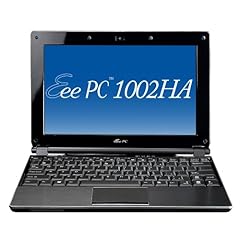
Asus Eee PC 1002HA 10-Inch Netbook (Intel Atom N270 1.6 GHz, 1GB RAM, 160GB HDD, Intel GMA 950, XP Home) Black

Diposting oleh fatih


Product

Product description from manufacturer

Slim, light, elegant: The Eee PC 1002HA with a casing of brushed stainless steel and 160 GB hard drive
The Eee PC 1002HA combines practical functionality with sophisticated design and brings a touch of elegance to the everyday mobile computing


ASUS, which expands the fastest growing notebook brand to its already multi-award winning Eee PC family with a new member: the Eee PC 1002HA. The Microsoft ® Windows ® XP Home newbie equipped primarily aimed at the style-oriented PC users, on the one hand puts great emphasis on functionality and mobility, and the other to an elegant look and light weight. Highlights of the novice, in addition to the 10-inch display, the power-saving 1.6 GHz Intel ® Atom ™ processor and 160 GB hard disk especially its completely new look. Unlike the Eee PC 1000H Eee PC 1002HA excels with a particularly low level of only 2.7 cm and weighing just 1200 grams this is the "Mini" considerably thinner and lighter than most netbooks currently available on the market . Particular emphasis is the Eee PC 1002HA through the use of brushed stainless steel on the display lid and on the palm rest. The stylish material gives the Netbook is not only stylish, but also an exceptional stability. Linked by the Eee PC easy use, with the typical high-quality optics of the Eee PC 1002HA combines practical functionality with elegance and in this way brings a bit of exclusivity in the computer everyday.

Powerful mobile companion - both professionally and personally
The Eee PC 1002HA is equipped with a variety of properties that have been specifically designed to make the users in the era of the 'mobile computing' everyday life more pleasant. To deliver the 10-inch WSVGA display with LED-backlit display (resolution: 1,024 x 600 pixels), a brighter, high-contrast image, and consumes little energy at the same time. Thanks to the big screen, large-format documents can also be easily viewed without scrolling back and forth again and again to have. And the entry meets the needs of users: Despite the small form factor, the Eee PC 1002HA has a standard keyboard, which is also entering longer texts easily achievable. Furthermore, the netbook also has a multi-touch pad that allows the navigation easier on the fingers.

Connectivity and entertainment on-the-go
The Eee PC 1002HA is demonstrated in daily use as a particularly sociable: The combination of built-in digital array microphone and 1.3 megapixel camera enables mobile videoconferencing - whether for business or pleasure - anytime, anywhere. In addition, the built-in Bluetooth 2.0 interface, an uncomplicated, wireless exchanges between the Eee PC represents a variety of Bluetooth-enabled devices capable of safely. For a fast connection to the Internet provides the integrated 802.11n wireless module to access data or Internet pages nearly everywhere realized via hotspots. Using the read built-in 4-in-1 card reader, the user is also able to format the MMC, SD, Memory Stick and MS PRO. Over the three USB ports can also be connected to a printer or other peripheral devices. For entertainment on-the-go "features the new netbook MP3 and video capabilities including a headphone set. The recovery thus takes place within seconds, the user can boot the F9 key with just a single touch the system again or produce.

Intelligent power management for long mobile working
The new Eee PC 1002HA scores not only with its sleek and stylish exterior, even in terms of energy efficiency is quite small in size. To the newcomer - as well as the exclusive equipped Eee PC S101 - with the power saving feature Super Hybrid Engine (SHE), which is out of the Power4 Gear Hybrid application and the Energy Processing Unit (EPU) is. While the Power4 Gear Hybrid feature the user has three performance profiles, allowing him to make friends' unique keystroke settings to suit the user scenario, determine the EPU the exact power requirements and adjusts them accordingly. Associated with the polymer battery, the user is, depending on the application, to benefit from a long battery life of up to five hours.

Combination of physical and online storage provides even more flexibility
In addition to the built-in 160 GB hard drive provides ample space for data, pictures and even videos, which contains the Eee PC 1002HA 10 GB of online storage space for the exclusive ASUS Eee Online Storage. This provides an enhanced storage capacity and enables users at any time and from any location provided from: - Internet access - access their documents and share them with their friends and family. To protect data from unauthorized access, each user can secure them with the help of a self-created password.

Product
10 "LED Asus EeePC 1002HA Black

More.....
Read More